












Provide First-Class support to your organization

Industry to Enterprise - Manage it all

TIKTING

AI-enabled · ITIL v4 · built for scale

The next-generation help desk for large organisations

TIKTING runs the whole service lifecycle for thousands of users and agents — with AI assisting triage, knowledge, risk analysis and reporting at every step, on-premises or in the cloud.

Explore TIKTING
integrated modules
8
agents per instance
1000+
on-prem data control
100%
  1. Help Desk Management

    Request, incident and problem management with an AI-assisted knowledge base

    One queue for every request, incident and problem. AI reads each ticket, suggests the category, priority and the knowledge article most likely to resolve it — so agents fix instead of sort.

    • Faster first response: AI triage and routing cut manual sorting to zero
    • Fewer repeat tickets: problem management finds and removes root causes
    • Self-service that works: a searchable knowledge base deflects common requests
    Learn more
    Help desk management
  2. Change Management

    Multi-stage digital approvals with rollout plans, backout plans and AI risk analysis

    Turn paper-based approval chains into auditable digital workflows. Every change carries its rollout plan, backout plan and checklist, and AI scores the risk before the CAB sees it.

    • No more paper: existing approval forms become multi-stage digital workflows
    • Fewer failed changes: AI risk analysis flags conflicts and high-impact windows
    • Audit-ready: every approval, plan and checklist is recorded with who and when
    Learn more
    Change management system
  3. Asset & Inventory Management

    Complete lifecycle tracking for IT and non-IT assets, stock and consumables

    From purchase to disposal, every asset is tracked, assigned and linked to the tickets and changes that touch it. Inventory keeps spares and consumables at the right levels across every site.

    • Know what you own: fixed assets, licences and stock in one register
    • Lower spend: reorder levels and utilisation data stop over-buying
    • Always accurate: Odysseus discovery keeps the CMDB in sync automatically
    Learn more
    Asset and inventory management
  4. Document Management

    A local Google Drive alternative — your documents, on your infrastructure

    Store, version, share and search organisational documents inside TIKTING. Folders, permissions and links to tickets and assets — without sending company data to a public cloud.

    • Data sovereignty: documents stay on-premises under your policies
    • One place to look: contracts, SOPs and manuals linked to the records they belong to
    • Version history and access control replace shared-drive sprawl
    Learn more
    Document management
  5. Project Management

    Plan and deliver IT projects alongside the tickets and changes they create

    Break projects into phases, milestones and tasks, assign owners and track progress — with the related changes, assets and documents attached, so delivery and operations share one picture.

    • Visibility: leadership sees status, risks and delays without a status meeting
    • Less duplication: project tasks and service desk tasks live in the same system
    • Accountability: every task has an owner, a due date and a history
    Learn more
    Project and task management
  6. Contract Management

    Vendor contracts, renewals and SLAs tracked against the assets they cover

    Capture every supplier, support and licence contract with its terms, value and renewal date. TIKTING warns before expiry and shows which assets and services each contract covers.

    • No surprise renewals: alerts well before expiry and auto-renew dates
    • Negotiate from facts: contract value tied to real asset and ticket data
    • Compliance: contract documents and approvals stored with the record
    Learn more
    Contract management
  7. Dashboards & Reports

    Fully customisable, AI-assisted dashboards and reporting

    Build the dashboard each role needs — service desk, CIO, asset owner — from any TIKTING data. Ask the AI assistant for a report in plain language and schedule it to land in inboxes automatically.

    • Decisions from live data: SLA, backlog, asset and change metrics in real time
    • Reports in minutes: describe what you need and AI builds the query
    • Board-ready: scheduled exports for management and audit
    Learn more
    AI-assisted dashboards and reports
  8. Remote Support

    See and fix the user’s screen straight from the ticket

    Start a remote session from any ticket, guide the user visually and resolve on the spot. Sessions are logged against the ticket for a complete record.

    • Shorter resolution times: fix it live instead of exchanging screenshots
    • Fewer site visits: support branch offices and remote staff from the desk
    • Full audit trail: every session tied to a ticket and an agent
    Learn more
    Remote support
Odysseus

Discovery · remote access · patching · compliance

Every asset found, reachable and compliant

Odysseus scans your entire estate without agents — computers, VMs, printers, CCTV and OT devices — syncs it into TIKTING, and gives you remote access, software deployment and policy compliance on top.

Explore Odysseus
  1. Agentless Asset Scanning

    Discover computers, VMs, printers, CCTV and OT devices — no agent required

    Network-level scanning finds every IP-connected device, fingerprints it and keeps the inventory current. Lightweight agents are available where you want deeper telemetry.

    • Complete picture: IT and OT devices, not just managed PCs
    • Zero rollout effort: nothing to install for agentless discovery
    • Shadow IT surfaced: unknown devices show up the moment they connect
    Learn more
    Agentless asset discovery
  2. Sync to TIKTING

    Discovered assets flow into TIKTING for fixed-asset management

    Every discovered device becomes a record in TIKTING’s asset register and CMDB — with hardware, software and ownership details — so finance and IT work from the same list.

    • One source of truth: discovery and fixed-asset register never drift apart
    • Audit-ready: physical inventory matches the books automatically
    • Context for every ticket: agents see the real device behind the request
    Learn more
    Sync assets to TIKTING
  3. Remote Support & Access

    RDP, VNC and SSH access to computers and servers from one console

    Connect to any discovered endpoint or server directly from Odysseus or a TIKTING ticket — RDP for Windows, VNC for desktops, SSH for Linux and network gear — with sessions recorded.

    • Resolve faster: no hunting for credentials or jump hosts
    • Secure by default: access through policy, logged per session
    • Branch and data-centre support without travel
    Learn more
    RDP, VNC and SSH remote access
  4. Software & Patch Deployment

    Install software and patches remotely, across the estate

    Package applications and OS patches once and deploy them to any group of devices on a schedule. Odysseus reports what installed, what failed and what is still missing.

    • Close vulnerabilities in hours, not weeks
    • Standard builds: the same software set on every device in a role
    • Proof of deployment for auditors and security teams
    Learn more
    Software and patch deployment
  5. Compliance Policies

    Define the right software and patches — and keep every device there

    Set policies for required software, forbidden software and patch levels. Odysseus continuously checks every device, flags drift and can remediate automatically.

    • Continuous compliance instead of annual panic
    • Licence control: unauthorised software is spotted and removed
    • Evidence on demand: compliance status per device, per policy
    Learn more
    Compliance policies
MITO Engine — Conversational AI

The ticket you never have to open

MITO Engine sits in front of your service desk and tries to solve the problem first. Only when a human is genuinely needed does it create a ticket in TIKTING — pre-filled and ready to action.

Solve before ticketing
MITO answers common requests and walks users through fixes — deflecting tickets that never needed a human.
Grounded in your knowledge
It reasons over your KB, past resolutions and asset data from TIKTING, so answers are accurate and on-brand.
Seamless hand-off
When it can’t resolve, MITO opens a fully-contextual TIKTING ticket — with the conversation, assets and category attached.
Always learning
Every resolution and escalation sharpens future deflection, lowering ticket volume over time.
Get started with MITO Engine

MITO Engine

Conversational AI agent

On a call
I can’t connect to the VPN this morning.
Your laptop (ATL-4471) shows an expired certificate. I’ve pushed a renewal — try reconnecting now.
That worked. Thanks!
Resolved without a ticket. I’ve logged it to the knowledge base for next time. 🎉

−85%

ticket volume

<30s

first response

24/7

self-service

How it fits together

A single loop, from discovery to resolution

Odysseus feeds accurate asset data into TIKTING. MITO Engine resolves what it can and files precise tickets into TIKTING for the rest. Nothing falls through the cracks.

Odysseus

Discovers, patches and remotely reaches every asset

TIKTING

AI-enabled service desk, assets, changes & reports — the system of record

MITO Engine

Deflects issues, opens tickets only when needed

Depth where it counts

TIKTING is the richest in features

Hundreds of capabilities across the ITIL practices your teams rely on — without the enterprise price tag.

ITSM with Task Management
Autoamtic Ticket Creation & Assignment
Adaptability
Service Level Agreements
Incident & Problem Management
Help Desk Management
Automatic Ticket Routing
ITIL Compliant
Work logs and Time Tracking
Dashboard & Reports
Internal Chat
Scalability
History
TIKTING — Enterprise Service Management
Asset Management
Recovery Point
Automatic Escalation
Flexible Deployment
User Access Management
Change Management
Knowledge Base
Multistage Workflows
Microsoft Active Directory
Secure API Integration
Automatic Responders

Common IT pitfalls

The BIG WHY.

You’ve Built a Product / Service and it may be well-designed, but support operations remain manual and uncontrolled. Following are the most common scenarios where organizations realize that their helpdesk adventure is no longer sufficient and why they move to TIKTING for structured, enterprise-grade service management.

No Complaint Tracking at All

Successful Product. Zero Complaint Visibility.

Your service is live and customers are active but complaints are scattered across emails, calls, and WhatsApp. Nothing is measurable, repeat issues go unnoticed, and accountability is impossible. Everything is untracked.

TIKTING centralizes all complaints into a controlled system with ownership, history, and resolution tracking.


Homegrown Helpdesk

You Built a Helpdesk Because You Could.

Your team created a simple internal helpdesk to log tickets but it lacks the operational control and meaningful insights. What starts as a “quick internal build” often turns into a long-term technical debt trap.

TIKTING is the result of years of refinement, real-world feedback, and with best coding practices. It’s battle-tested, well-documented, and continuously updated by a dedicated team to ensure quality, security, and feature growth.

ERP with a Built-In Helpdesk

ERP are not designed to run support operations.

ERP helpdesk modules are transactional, not operational. They lack flexibility, usability, and service-level control for real-world support teams.

TIKTING is not the replacement rather it complements your ERP by handling incidents, requests, and changes properly—while your ERP focuses on finance and core operations.

Open-Source / Opoo Helpdesk Solution

Low cost upfront. High Cost in Control and Risk.

They work for basic ticketing but falls short for structured escalations. Over time, gaps in security, accountability, and scalability become operational risks.

TIKTING provides a supported, enterprise-grade alternative to open-source limitations.

Cracked / Pirated Helpdesk Software

Exposes your systems to malware, data leaks, and unauthorized access.

When your helpdesk is synchronized with Active Directory, it has access to user identities, roles, and internal systems. Running cracked or pirated software in this environment introduces direct security exposure to your core infrastructure and the responsibility lies entirely with your organization.

TIKTING eliminates this risk by providing licensed and secure software at a predictable and controlled cost.

Media & Videos

Watch product demos, tutorials, and learn how TIKTING can transform your enterprise service management.

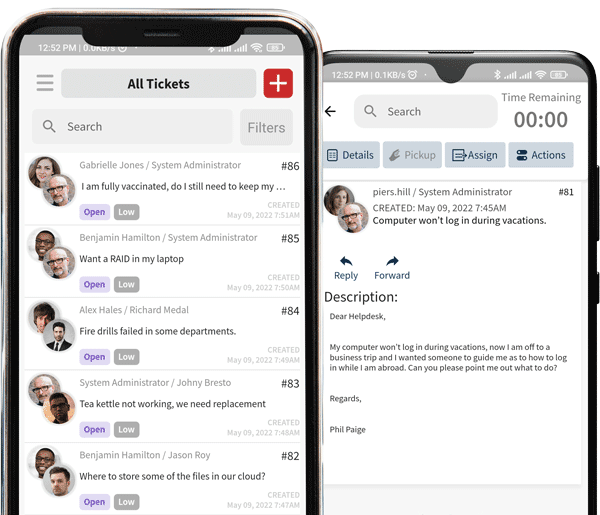
Tikting for iOS & Android

On the go updates, connected anywhere anytime.

Get it on Google Play Download on the App Store
Tikting mobile app preview

Our partners

Trusted by a growing network

Our reselling partners deliver expert implementation, training and support for TIKTING worldwide.

Arcana InfoUnity SolutionsDigitelICT IntegratorsRiz TechnologySalah Bin AhmadTechnoBIZ

Ready to resolve more and ticket less?

Bring discovery, AI deflection and service management together with ITDEVTECH. Tell us how you’d like to deploy and we’ll get you started.

  • On-premises or cloud, your choice
  • Guided setup in minutes
  • Talk to a real person any time

On-Premises

Download the Installer and deploy on your own server

Add on-premises products (optional)

Phone Number

Please type the number with the international dialing code (e.g +81)